I built an app called SillyPages™ for macOS. Before I dive into how I built it, or what it does, this is “why I built it”.
For me, journaling is a way to look back and see the progress I’m making in life, a way to help with anxieties, and also a place to post about what I’m doing at a specific point in time in my life. It’s just for me, kind of like this site, but easier to use because it’s always up on my computer (or phone). It’s less polished and more about feelings and stuff like that. That line reminds me of this great video…. “Feel Inside (and stuff like that)”
So when I started journaling, like 12 years ago, I wanted a simple app I could use that was either a one-time purchase / free, had the ability to add pictures, and worked on my mac and my iphone (now an android). I found DayOne which was PERFECT for what I wanted and although there were bugs and it seemed to never “break outta beta” it worked well, and it still does if you don’t mind paying and just want an app to record everything for $50-75 per year.
Eventually, like most apps nowadays, they wanted to change the way they received payments for it. Instead of a pay-once and have it for life, they went the subscription route. Annual Recurring Revenue. ARR. 🏴☠️

I stayed on for a long time because I had A LOT of journal entries and I generally liked the app, but as time went on, the app stayed the same (or the features that were added didn’t interest me), and the price increased. They introduced Basic, and while that is free (and great for someone starting out), I already had more than one journal and I was adding more than the one allotted image per entry, plus my own audio recordings, had my own colors.
What finally made me say good bye was three things. First, I got prompted to upgrade to gold. I’d been using the app for over 12 years at this point and paying for the yearly subscription for quite a few of those, and new features were mostly being added to the GOLD plan now so if I wanted to have any of those, I’d have to upgrade. Second they added in AI, for self reflective journaling. “Reflective AI Summaries & Prompts… Image generation… title suggestions and more”. Third was having a place in the app that reminds you that you aren’t on the best version. To me, that is like an unread notification you can’t dismiss.
THESE ARE THE REASONS FOR THE SWITCH
- If I wanted AI to write my journal entries or prompt me I could use a free service to do that, isn’t part of what making Journaling personal is using your own thoughts rather than having AI tell you what to write about.
- Stopped adding new features to Basic and Silver (also price increases)
- I hate when apps add something that constantly reminds you to “Upgrade”

So I was like, what would it take for me to build a replacement for myself and how do I get all my journals and entries out so AI doesn’t start using them to improve itself (it honestly probably doesn’t do that, but you never know amirite).

I had built another app in swift for tracking my games and while that was difficult it wasn’t TOO HARD. Ok, yeah, it was super hard, but at least most of the questions I wanted answers to while building it were already out on the internet, and I had an AI assistant to help me. If DayOne can use AI, I can too, it’s only fair. So I brushed up on my swift skills and started tackling what would be a replacement for myself.
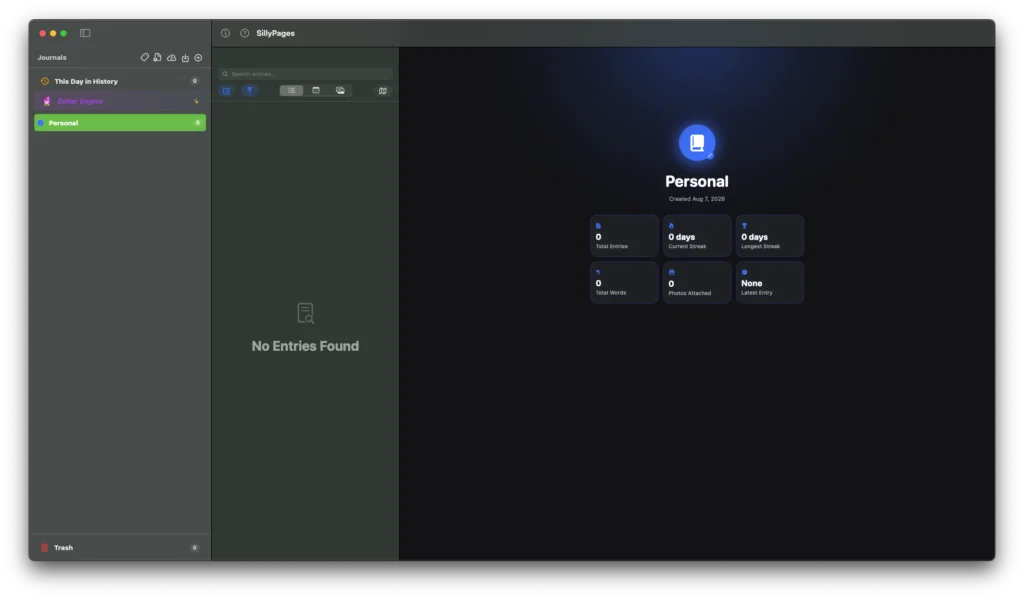
Most apps built on macOS look pretty similar. When I built SillyGooses™ I had it use the native Apple buttons and layouts like sidebars, columns, details and so on. I set the app up to use a three column system similar to macOS Finder and actually pretty similar to most journaling apps.
On the left there would be journals or notebooks or booknotes or whatever you wanted to call the collections. The middle column would be different ways of viewing the entries and the far right column would always be an edit / preview window (the actual entry).
Building a journaling or text app in swift WAS HARD. Harder than building a kanban board / game collection app. It needed to be super snappy, and I already had a HUGE main journal with over 5000 entries and ~10000 images and files attached. I had to learn all about lazy loading, what can cause systems to freeze, what thresholds there are for mac apps, ways to load data quickly and cache data efficiently. All in all it was a cluster**** and I went back to the drawing board SO… MANY… TIMES.
But in the end I really wanted to stop paying for something I could potentially build myself, and I got it to a place where it might not be as snappy as other apps, but its exactly what I wanted. It generally handles my main journal of over 5000+ entries very well for an app made by one guy after work. It does freeze every so often but so did other Journaling apps I’ve used. Pretty proud of my progress and building it myself makes me wanna journal even more each day. I even worked in some fun features like this day in history specific view, tag clouds, and a zoltar engine that gives you some baked in prompts, and templates. You can even import your DayOne entries with very little issue, export backups, and create as many journals and entries as you want. I also tried my hand at making a PDF export and its not great yet, needs more tweaking to the logic, kinda lame actually. DON’T USE THAT FEATURE. Look away. Avert your eyes.

I named the app SillyPages™ (to stick with the silly_theme) and while I’ve slowed down on building it I shared it up on my SillyHole™ site along with SillyGooses™. If you are feeling adventurous try it out and I hope it helps you journal. I might eventually put it on gitlab but for now its just gonna be for me and anyone who trusts downloading zip files from a site called SillyHole.com. Probably very few people tbh. Take me to your SILLYHOLE.